So I built an RSS Reader (Pt.2)
Two weeks ago I wrote about building an RSS reader. I said it would probably crash with more than 20 feeds (or I lose motivation). It didn’t crash but I needed to optimize it a bit.
I now have 52 feeds in 13 folders. The page loads in about 70ms on shared hosting with ~3.000 articles in the database. It’s super cool that this is all HTML/CSS with only minimal JavaScript e.g. restoring scroll position.
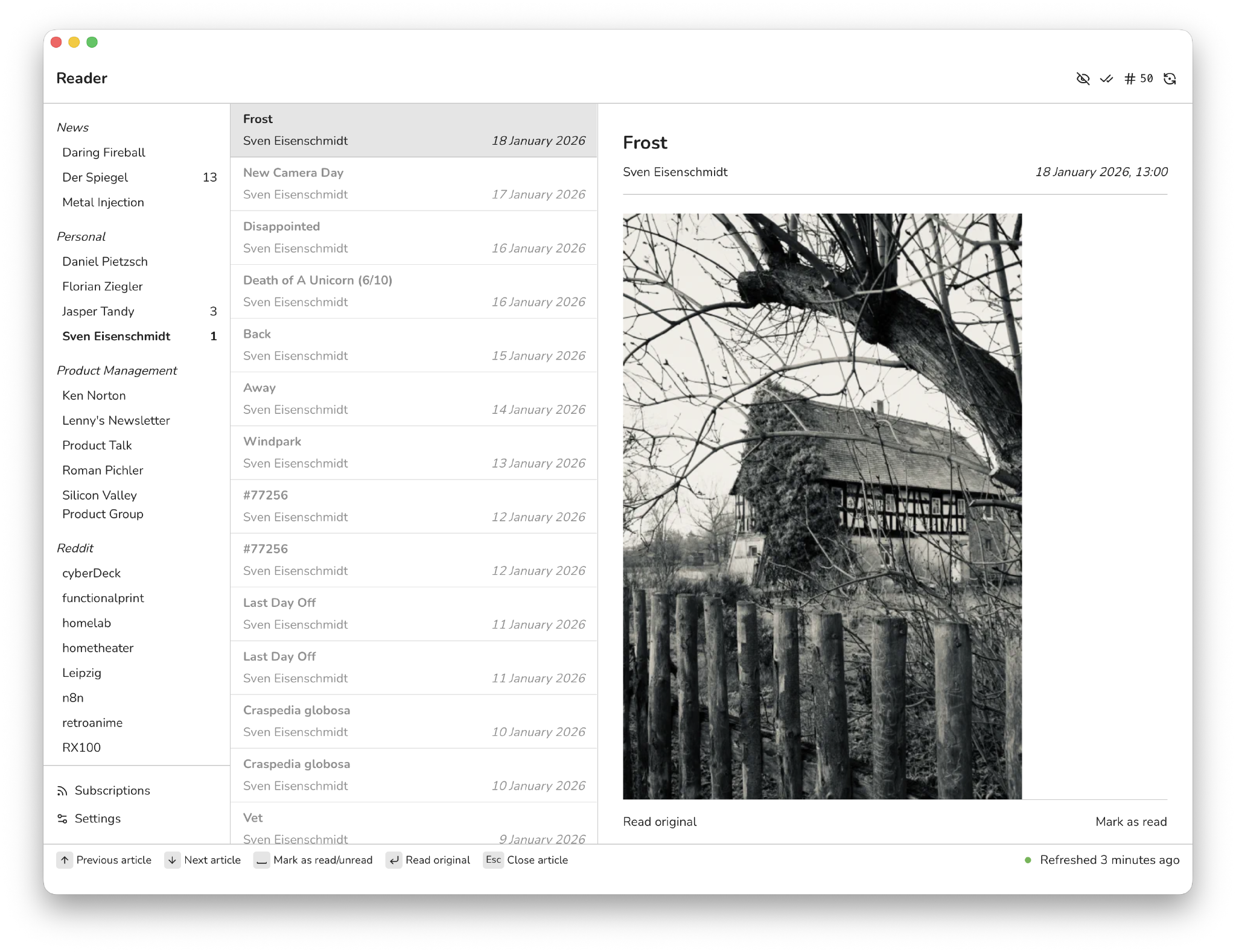
What makes me really happy is that I did not lose motivation as with other projects in the past and I have been steadily using and improving the app as I used it multiple times a day. On iOS as a homescreen app, on macOS as a browser tab.
What wasn’t so clear to me initially is that I will use the app in different ways across iOS and macOS. Which was a fountain of inspiration eventually and a source of ideas for new features. When I have an idea, I just go to GitHub and file a new issue myself. That’s where most of the new features came from. So that’s the things I added:
- Auto mark-as-read after 5 seconds. Optional and off by default.
- Bookmarks to save articles for later, unfortunately still a bit buggy. Optional and off by default.
- Feed discovery for YouTube and Reddit. I paste a channel or subreddit URL and Reader finds the RSS feed. Jasper suggested this feature.
- Folders to organize subscriptions, a nice surprise was that this helped with OPML imports that have a nested structure.
- Keyboard shortcuts for desktop: Tab/Shift+Tab for subscriptions, arrows for articles, Space to toggle read, Enter to open, Escape to close. Optional and on by default.
- “Mark as Read & Back” button for mobile. One tap to mark as read and go back to the list. I use this constantly on mobile but do not want to have it on Desktop.
- OPML import/export to move subscriptions between RSS readers.
- Pull-to-refresh on mobile but I personally disabled it and wait for the background refresh to run each five minutes. I think it create a habbit of refreshing and always checking for something new.
- Status page with background worker health, subscription stats, and processed queue messages like cleaning old feed items.
- Support for archive.is per subscription to get around paywalls, super helpful for news articles from Der Spiegel for example. Sites load a bit slower but it’s worth it.
- Word filter to hide articles containing specific words, e.g. NFT.
Coming back to what I wrote earlier: I use Reader differently across iPhone and macOS. On desktop I scroll through the article list, click one to read it, and the list stays visible on the left. On mobile you only see the reading pane. Previously I had to tap Mark as Read, then ← Back to return to the list, two taps for something I do constantly. I had the idea to use different behaviours for the app, there’s a single Mark as Read button, but on mobile it also gets you back to the reading list.
I am not sure if I will have more features like this in the future where there is a different behaviour for mobile and desktop. Certainly it is not difficult to implement.
Going beyond RSS#
I am a heavy user of YouTube and Narwhal (iOS Reddit client). I was surprised to see that both YouTube and Reddit still offer RSS feeds for getting content but it is super opaque to get them. Initially I crafted the right feed URLs myself and added them as a subscription. But this requires anyone also to know about how these URLs are crafted.
Now, for YouTube and Reddit, the correct feed URLs are automatically extracted from the channel’s or subreddit’s URL.
But Reddit is even more complicated than just extracting the right feed URL. The problem with using the default RSS feed is that in most subreddits the post lists are a never ending stream of low-quality content. It clogged up my reader before auto-mod or human moderators removed the posts. I added a feature to the importer that you only need to add a subreddit link and the right RSS feed is configured: top posts of the last seven days with a limit of 25. This gives you a rolling list of the top 25 posts with new rising posts being automatically included and the ones that fall out of the seven days window stay persisted in your feed as they have been persisted already.
Fun with Server-Side#
Click handling#
Managing click-outs properly with read status was a nightmare with JavaScript. Getting it consistently working across browsers and devices annoyed me. I wanted to have an article marked as read when I click on the title or an inline link, but Safari mobile blocked the form submission triggered by JavaScript for the Mark as Read button while opening the article in a new tab. Also opening articles consistently in a new tab was not working.
The solution was to introduce an /open route for article URLs and article content links, using a sanitizer (config) and an open controller action. It’s so much fun seeing this working server-side only. It helped me to kill a bunch of JavaScript and has been working flawlessly since I introduced it.
The sanitizer configuration possibilities are powerful and I was able to include with a config setting to rewrite all URLs to open in a new tab.
YouTube embeds#
YouTube RSS feeds only contain a link to the video, no embed code. I wrote a processor that automatically converts YouTube links to embedded video players during import. Now I can watch videos directly in the reader.
Missing titles#
Some feeds have no title. Seriously?! Guess what. Also solved server-side during import with a processor that generates a title from the article excerpt.
Performance#
A few things I changed to get the page load down to 70ms. Not just server-side optimizations but also client-side resource handling. The 70ms are very subjective and on a larger server it will likely be even faster, or smaller server and slower. That’s the baseline I use now.
Single SQLite database#
I moved from multiple database connections and separate SQLite files to a single database. This allows me to run queries across all tables without workarounds like ATTACH, where in the past tables where scattered in different databases. Now I use a a simpler architecture that supports faster queries. Ideally I should have done that from the beginning and it should not be considered as an improvement here but hey, that’s how it is. Why did I do it initially? I do not know, it felt like a good idea at that time to have isolated databases, I would not have done it with PostgreSQL or MySQL.
Article limit per subscription#
Some RSS feeds are terribly built and send their entire history on every request, which would be the case for my refresh every five minutes. I had one feed that delivered over 700 articles. Now I keep only the last 50 articles per subscription and apply the same limit on import. As a side note: I also observed that some feeds bump up old articles or change them so they show up again with a different GUID.
Inline CSS and JavaScript#
I load CSS and JavaScript inline via a custom Twig function from Symfony’s Asset Mapper. While with HTTP/2 multiple assets requests are not a problem nowadays, this avoids extra asset requests at all. Yes, there would have been a proper approach with HTTP/2, pre-fetching and -loading but I could not be bothered so I removed that part of the equation completely.
Using JavaScript to restore the scroll position led to flickering as the DOM rendered before the script could set the position. Loading it externally required DOMContentLoaded, which was too late. Inline in a sens eof having the script tag directly in the HTML where the element was located was better but Safari’s parsing timing made it inconsistent.
But I really wanted to have the scroll position locked in at the same place as before without any flickering or visual change. I would not have used the app anymore if that would have been a recurring issue. Little things like this can annoy the hell out of me.
The solution was to embed CSS and JavaScript minified and inline directly in the HTML and for JavaScript use self-invoking functions. I wrote a custom Twig extension that pulls assets from the Asset Mapper and inlines them:
In the template:
<script>{{ asset_inline('js/scroll-restore.js') }}</script>
In the produced HTML:
<script>/* /assets/js/scroll-restore-2eCjKBl.js */
!function(){function e(e,t){if(!e)return;const s=sessionStorage.getItem(t);s&&window.requestAnimationFrame(()=>{e.scrollTop=parseInt(s,10)}),e.addEventListener("scroll",()=>{sessionStorage.setItem(t,e.scrollTop)})}const t=document.querySelector("[data-reading-list]");if(t){e(t,"scroll:"+(t.dataset.subscription||"all"))}e(document.querySelector("[data-sidebar] > ul"),"scroll:sidebar")}();</script>
I understand that a lot of people think this is a hack, but does it really matter? It’s a HTML page with lots of text, a few kb of inlined CSS and JavaScript for a far better user experience was an easy choice for me.
Page Transition Animations#
On desktop I use CSS page transitions for smooth navigation between views. Unfortunately this is very slow on mobile Safari, so I disabled it there.
The perceived performance feels very fast, like a SPA, even though everything is server-side rendered and the page is fully transferred on every request.
Conclusion#
I gave up reading RSS feeds a long time ago because I never found a good reader that matched my expectations towards features and user experience. I think I found it finally with this project. The code is open source.