Dragon Touch (Pt.2)
A follow-up to the Dragon Touch post from a few days ago, about two things that bothered me enough to fix.
Coming back to what I foreshadowed in my last post about our new tablet, the first issue was security: the Dragon Touch connects to Google Calendar, and that means it holds OAuth tokens for my Google account on a device I do not fully control. Even with limited calendar scopes, those tokens are extractable, and the device roams freely on my home network. I am not comfortable with that long-term.
Another issue was with how the calendar displays events: Nadine and I share a family calendar, but not all appointments between us belong there. When I am backup for the kids because Nadine is away, we handle that with appointments in our primary personal calendars where we add the other person. The Dragon Touch app does not merge these cleanly, so the display is always duplicating things. We have a lot of these next to full family events, so things get crowded quickly.
The native app is a closed system I cannot fix - in a sense of changing individual features. But Dragon Touch left the ADB interface open, and a 27" touchscreen with a built-in OS is not cheap to replace with something custom, so I was going to get my money’s worth.
I extended dragon-touch-mcp, my npm package for controlling the tablet over ADB. What started as a small set of MCP tools has grown into something closer to a remote and kiosk management solution. It can now provision a self-built browser on the tablet: a minimal Android WebView app, no UI, no tabs, just a URL in fullscreen. The tooling lets me push a custom web app to the tablet with a single make target. As long as the tablet is not restarted, the kiosk keeps pulling itself back to the foreground, including after the display wakes from sleep. I am confident I’ll find a way to make the kiosk mode sticky beyond reboots.
On top of that I built a small closed-source web app for my family. It reads calendars from private Google Calendar ICS URLs, a read-only format that Google lets you generate without granting anyone access to your account. It also offers a LocalStorage-based solution to show the kids their daily tasks. That also fixes the merge problem: personal appointments Nadine and I add to each other’s calendars now show up correctly. The kids’ tasks are on the bottom part of the calendar view, which was the other reason I wanted to build this myself. Kellin and Tilian can easily reach the interface that is most important to them: unlocking the TV task for their TV time slot each day.
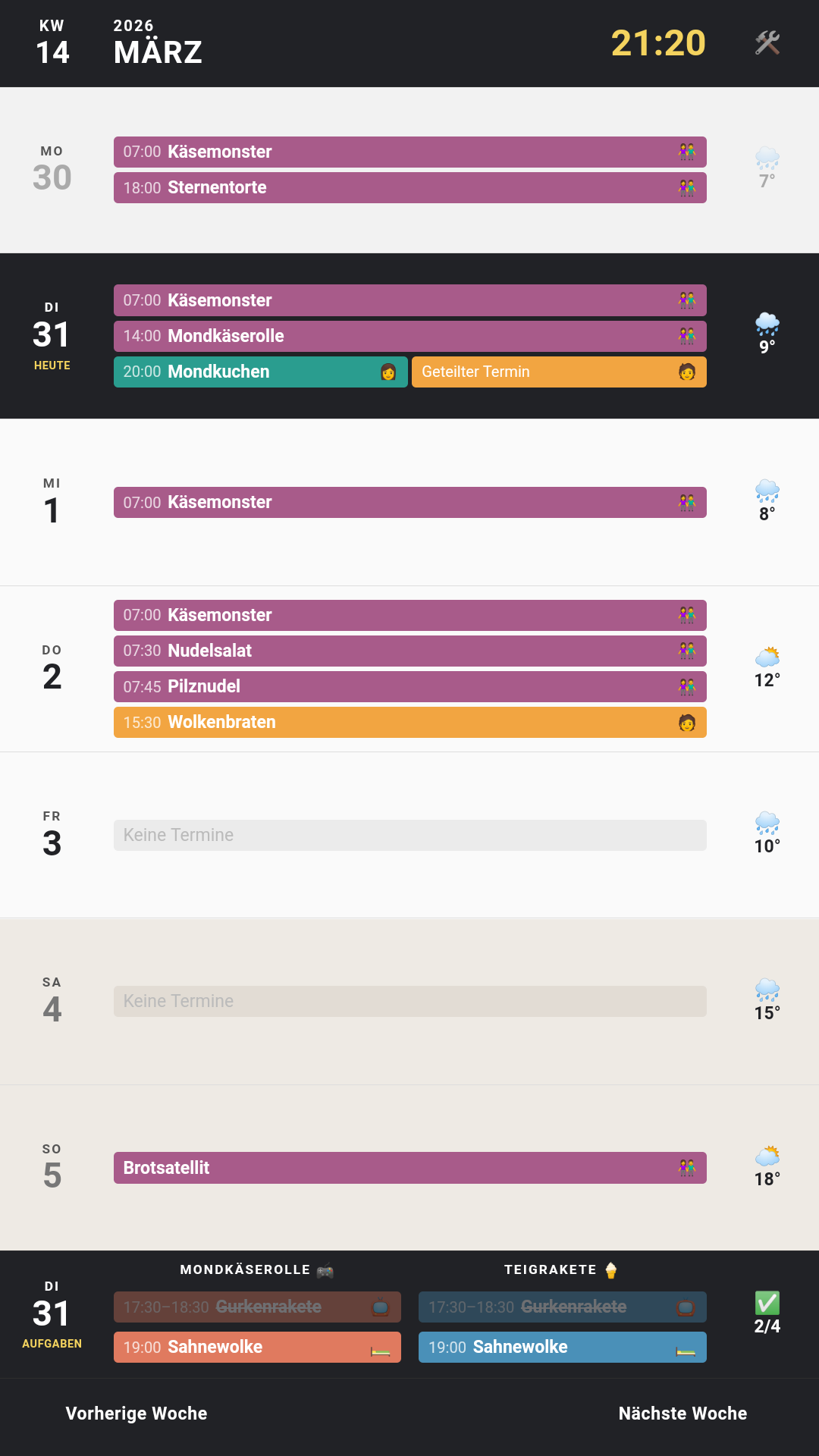
The small web app solved every problem I had with the original setup. Nadine called it “pretty crazy”, which means a lot if you know her.