Claude
My software development at home has shifted away from typing code to writing messages into an empty chat window as Claude Code got “better”. Better in the sense of writing complex code, it is still annoying in its writing style. I got it under control with lots of training wheels (anti slop rules, superpowers) attached to it.
Most of my time with Claude now is brainstorming new features and doing technical analysis on top of actual code, especially for Hypo: weird camera bugs, day-long implementation sessions for a specific RAW format, edge cases with camera tethering. So there are usually a few sessions running on my laptop working in the Hypo project folder. Today I can access these sessions remotely via /remote-control from my phone, as long as I started them at the laptop first.
I want to be fully on top of any line of code, documentation or behaviour that is written by Claude. Ideas, however, do not wait until I am back at my laptop, and I want them checked against the code and written into GitHub as issues right away, with the analysis already done. So just jotting them down in GitHub issues via the GitHub mobile app was not the best option.
All my code ends up on GitHub eventually, issues and pull requests included, and everything else sits on my laptop: Xcode, test automation, virtual machines for the two macOS versions I test on, the Claude superpowers plugin, and a memory that has been collecting outcomes of me fighting Claude for months to be more like how I do things than it would want to do it. For me the strength is the combination of both. The Claude app on my phone without access to a local session has none of it, it only knows what I type into the chat. Without a local session first that had a /remote-control initiated I can’t do much from my phone.
Claude Code has a way to solve this, a Remote Control server: claude rc runs in a project folder without a session and makes it reachable from the Claude app on my phone, and the session gets created when I select the device in the app and ask it to spawn a session. That removes the session I have to start in advance, but it does not remove the claude rc server itself, which runs for one project folder and still has to be started at the laptop.
So I spent an afternoon writing a menu bar app, and when I say I - it was Claude: Claude RC Manager gives me an always on connection to my laptop by spawning pre-configured claude rc instances in my project folders. Which is nice no? The project folders I work on stay reachable, and a session opens in the right one when I select one from my phone.
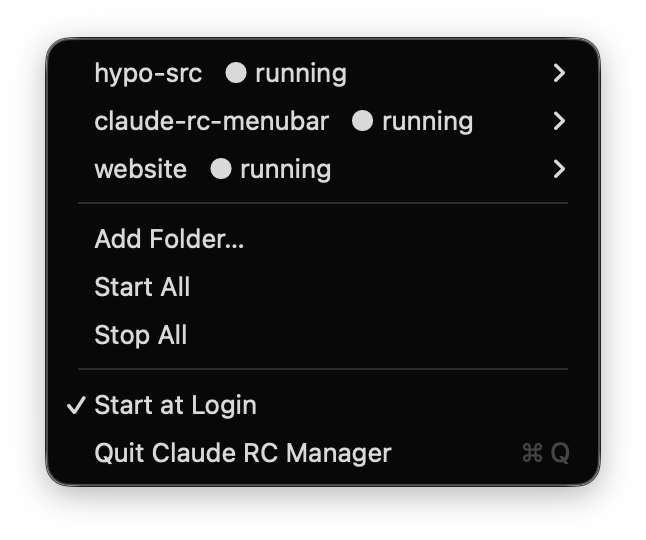
Claude wrote a nice README, go check it out.
The app does nothing Claude Code cannot do on its own, it only keeps the connection up: force-quit it and the claude rc instances keep running. What it gives me is access to a project folder that is already up when I have an idea, and a session that gets created from the phone instead of from a terminal I am not sitting at. If Claude Code ships this as a built-in next month I will archive the repository and be happy about it.